Introducing Chromatic — UI testing for React
👋 Say bye to UI regressions

TLDR: We’re launching Chromatic, a new UI testing tool for React. Automatically QA the look of all your components, track their appearance from commit to commit, and get notified of visual changes. Sign up below for early access!
Updates
July 2018: 🚀 Chromatic 1.0 is generally available!
June 2018: 🎛 Self-serve
June 2018: 🌅 Early Access ending
June 2018: 🔤 Expanded fonts support
June 2018: 🔑 Bitbucket and GitLab
May 2018: 📚 New accounts design
April 2018: 🗝 Access control and integrations
March 2018: ⚡️ Live View and email notifications
March 2018: 👋 Onboarding and performance
Feb, 2018: 🔍 Review and collaborate with your team
Jan, 2018: ✅ The Chromatic homepage is live!
Jan, 2018: 🗺 Easy repros with fully-inspectable components
Dec, 2017: 🗂 Projects and collaboration
Nov, 2017: 📕 First-class Storybook support for launch
Testing user interface has always been tricky. The details of UI design are subjective “does this shadow work?” and nuanced “that button is a pixel off”. The easiest way to check if a design looks right is still visually –with the human eye.
Yet, testing UI this way is impractical. It means reviewing hundreds of design permutations by hand. In reality, most teams can’t afford full UI test coverage so they endure the inevitable regressions.
Like you, I’ve spent countless hours fixing UI regressions. Sometimes they’re obvious –rogue CSS is infamous for ruining layouts. But more often, what seems like a minor tweak results in major bugs. What’s more, with apps moving toward continuous integration and “heavier” frontends, pinpointing UI regressions is harder than ever before.
How to prevent bugs
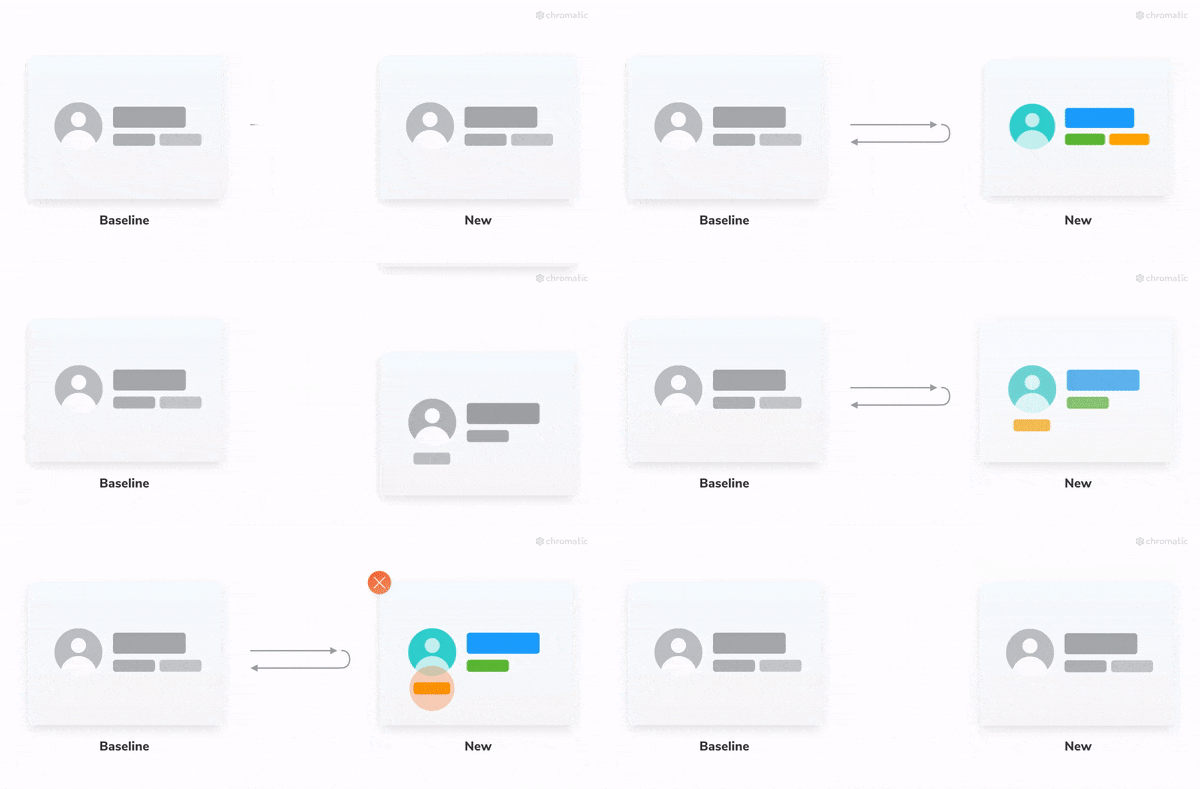
What if you could detect UI bugs as soon as they occurred? If your UI components had visual tests, you’d know anytime a regression happened. Visual tests compare the rendered output of components –“the look”– from commit to commit. They warn you when a code change causes a component to look different.
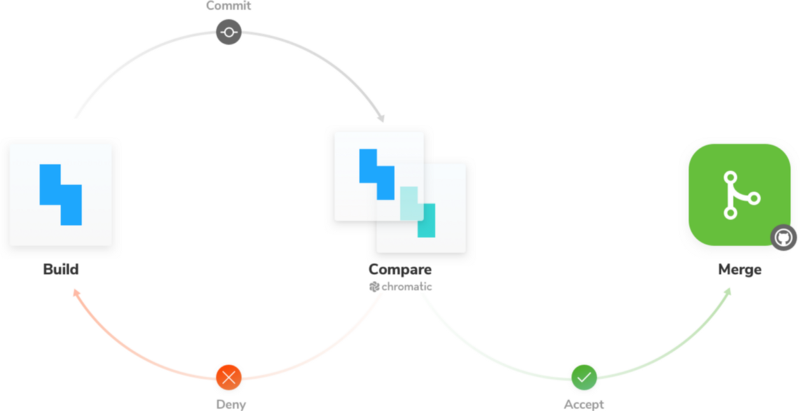
Consider this workflow:
- Work on React components as usual
- Commit code to Github
- Get warned instantly if your components don’t look right
- Fix UI regressions and move on
This workflow would mean you discover UI bugs during development long before code hits production. Your users would never see a UI regression again.
Seems like a lot of work…
Unit and end-to-end testing already require a lot of effort. With Chromatic, UI testing doesn’t have to further tax your team. Why not take advantage of what you’ve already built –components– to test your UI? Every time a component renders in your development environment, you are implicitly creating a test spec. Chromatic helps you record those specs and play them back later as tests.
Interested? Sign up for early access below
You build components and Chromatic does the rest
Tom, Zoltan, and I decided to create Chromatic to automate UI testing once and for all. It’s clear that teams everywhere continue to suffer due to UI regressions. But in the past, do-it-yourself tools proved too onerous and off-the-shelf solutions too broad for many teams to get onboard.
UI testing shouldn’t be complicated. Developers already do the hard work building components. Chromatic makes it effortless to UI test those components. With Chromatic, you and your team add UI tests in 1-click and can achieve full test coverage in minutes.
Automatically QA the look of all your components, track their appearance from commit to commit, and get notified of visual changes. Chromatic integrates seamlessly with your existing Github/CI workflow so you can rest easy knowing that your UI looks just right.
Get Chromatic early access below!
Say bye to UI regressions
Chromatic is in active development. We are currently getting ready for our pilot. There are still some places available, if you’re interested in getting early access (and free usage) fill out the form to see if your company qualifies.
Update July 2018: Chromatic 1.0 is live. Sign up for your free trial.
Common questions
Why build Chromatic now?
Components. Modern view layers like React help you divide complex UIs into simple components. We found visual testing at the level of components made it easier to scope tests and identify regressions. Compared to other techniques, this makes testing modern client-heavy UIs more precise and less brittle. Chromatic makes UI testing painless, no matter how big or complex the app.
Who are we?
We love the intersection of engineering and user experience. Previously, our team helped tens of thousands of developers architect their apps as core engineers of popular JavaScript framework Meteor and widely-loved GraphQL stack Apollo. Before that, companies like Apple, Havas, and Yummly consulted with us to solve their frontend challenges. Currently, we help maintain widely-used open source component explorer Storybook.
Does Chromatic work with Storybook?
We are active maintainers and fans of Storybook. Rest assured that your Storybook stories will sync with Chromatic. Anytime you update a story your tests will also update.
📕 If you don’t use Storybook, that’s cool too. Chromatic works just as well!
Are there any other dependencies?
Nope. Just add our package from NPM and you’ll have everything you need.
Why use Chromatic alongside unit tests with Jest, Enzyme, etc?
Chromatic aims to make the process of building visual tests automatic. Creating and maintaining your Chromatic test suite takes much less effort than unit tests.
However, writing careful unit test cases is still valuable. If your component has complex functionality you could still use unit testing tools to programmatically test specifics. In practice, we’ve found this approach does not scale with your app’s general components.
Why use Chromatic alongside end-to-end tests with a tool like Selenium?
End-to-end(E2E) tests are great for QAing the user’s “happy path” and ensuring that the flow works well. But, they’re complicated to create and brittle to maintain. This means, usually, companies cannot reasonably maintain an E2E suite with good coverage. Thanks to specifying tests at the component level, Chromatic gets many of the same benefits as E2E at a far lower cost.
How do Chromatic’s visual tests compare to snapshot tests?
Taking a snapshot of a component’s HTML output (the markup) is a similar idea to taking a visual test (which captures an image of your component). There are two main reasons Chromatic complements or replaces snapshot testing though:
- The way the browser renders the HTML is also determined by styling and assets such as images, which are typically not included in the snapshots.
- If a screen or snapshot changes, it’s not necessarily a “failure”. You need to review the changes and decide if they are intentional or not. This is can be hard to decide when all you have is a HTML diff.
Alright, so when can I try Chromatic?
Our aim is for early access customers (folks like you!) to start using it October 1st. Every feature might not be built at that time, but you’ll be able to test your UI immediately.
Is it only for React?
Yes for now. Other view layers coming too, let us know which you’d like us to support first on Twitter!
Have more questions? Follow Chroma on Twitter